The Disney Epic Mickey: Rebrushed control layout and button mapping for PlayStation, Xbox and PC controllers are detailed below. Rebrushed modernizes the original Epic Mickey experience with refined combat, platforming and camera controls while preserving its paint-and-thinner based gameplay built around creativity, exploration and player choice.
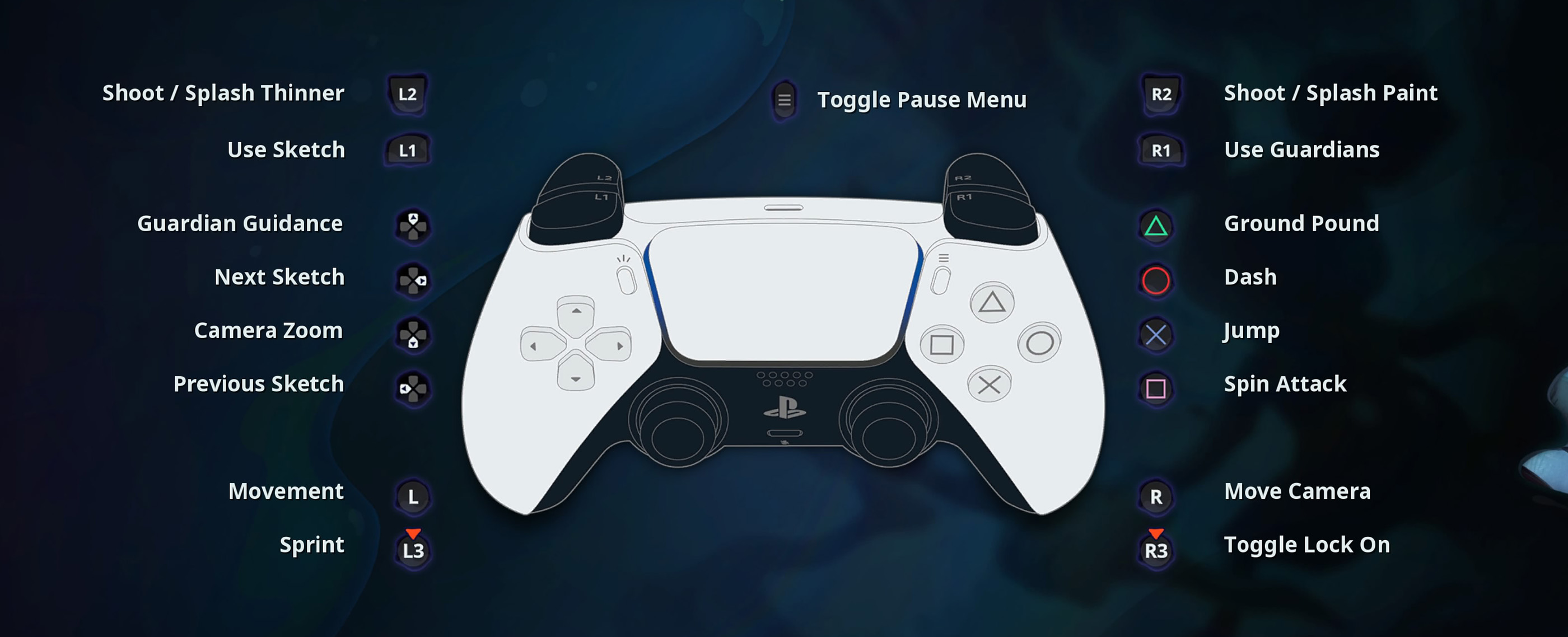
Disney Epic Mickey: Rebrushed Controls
| Action | PlayStation | Xbox / PC |
|---|---|---|
| Move | L | L |
| Sprint | L3 | LS |
| Move Camera | R | R |
| Toggle Lock-On | R3 | RS |
| Shoot / Splash Thinner | L2 | LT |
| Shoot / Splash Paint | R2 | RT |
| Use Sketch | L1 | LB |
| Use Guardians | R1 | RB |
| Jump | X | A |
| Dash | Circle | B |
| Ground Pound | Triangle | Y |
| Spin Attack | Square | X |
| Guardian Guidance | D-Pad | D-Pad |
| Next Sketch | D-Pad Right | D-Pad Right |
| Previous Sketch | D-Pad Left | D-Pad Left |
| Camera Zoom | D-Pad Up / Down | D-Pad Up / Down |
| Pause Menu | Options | Menu |
| Remap Input | Square | X |
| Back | Circle | B |
Comments
No comments yet. Be the first to share your thoughts!